OBD2 · ELM327 · AndroidiOS coming soon

Your car's check engine light, explained.

OBD Master Pro is an OBD2 car scanner and code reader for ELM327 adapters. Plug in a Bluetooth, Wi-Fi or USB adapter, read fault codes, see why the check engine light is on and watch live data on your phone. No proprietary dongle needed.

Get it on Google Play
1.6K+ reviews on Google Play
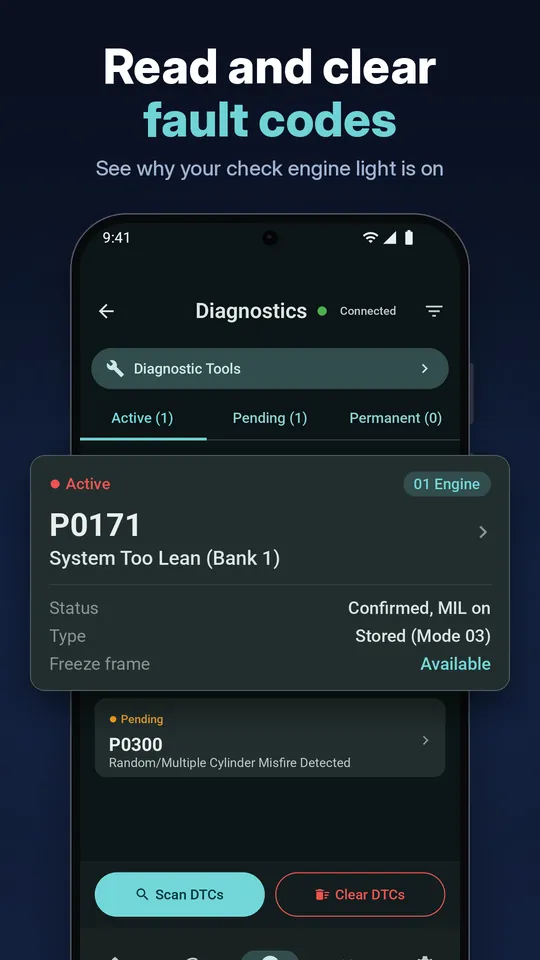
OBD Master Pro reading and clearing fault codes
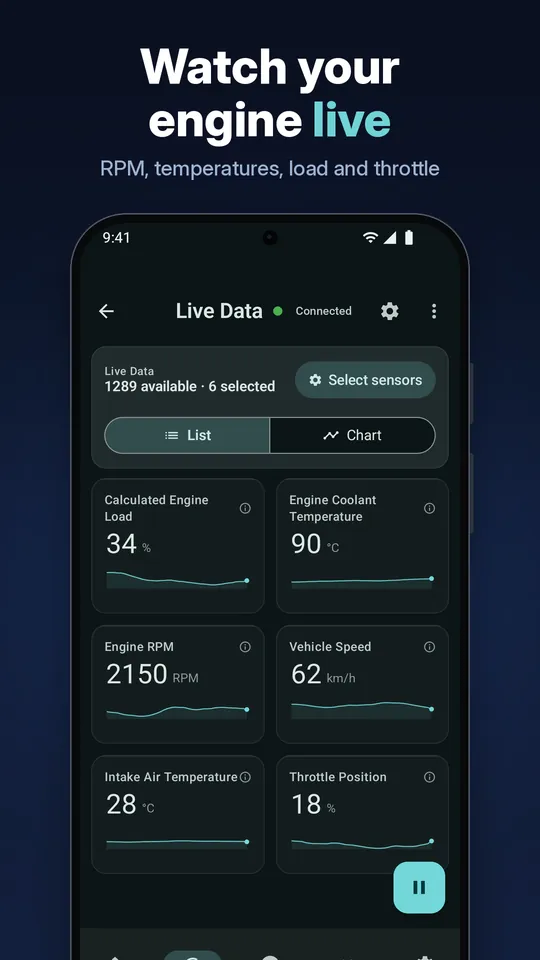
OBD Master Pro live engine data gauges

Everything you need to diagnose your car

From reading a check engine code to ECU coding, OBD Master Pro turns your phone and an ELM327 adapter into a full car diagnostic tool.

Read & clear fault codes

Read stored, pending and permanent trouble codes (DTC), find out why the check engine light is on, and clear codes to reset the warning light.

  • Engine, ABS, airbag, gateway, cluster and other modules on supported cars
  • Generic and brand code descriptions, plus DTC search without connecting
  • Manufacturer codes, DTC Wizard, warning light guide and symptom checker

Live data & custom dashboard

Watch OBD2 sensors in real time on circular or digital gauges, live charts and a dedicated O2 sensor screen.

  • RPM, speed, coolant temp, load, throttle, intake air, MAF, MAP, fuel trims, O2 / lambda, battery voltage
  • Brand data such as oil temp, boost, DPF, gearbox or EV cell data when your profile has it
  • Data logger, recorder with playback, custom PIDs, HUD, Car mode and voice commands

ECU coding & service

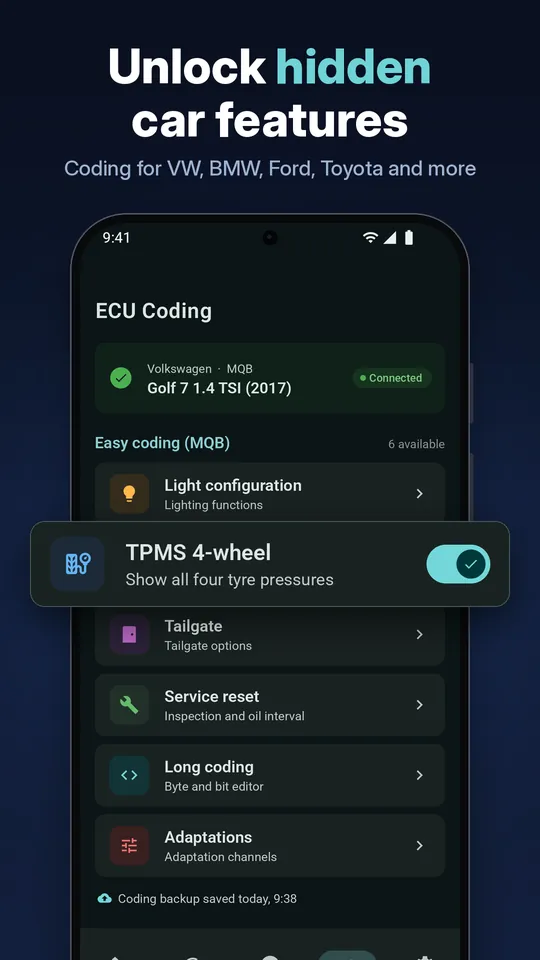
Coding for VAG, BMW, Hyundai / Kia, Renault, Stellantis / FCA, Nissan, Ford and Toyota / Lexus.

  • VAG coding for MQB, PQ26, MLB-Evo and more, long coding and adaptations
  • Service and oil resets where supported
  • Coding backup and restore

Emissions & diagnostic tests

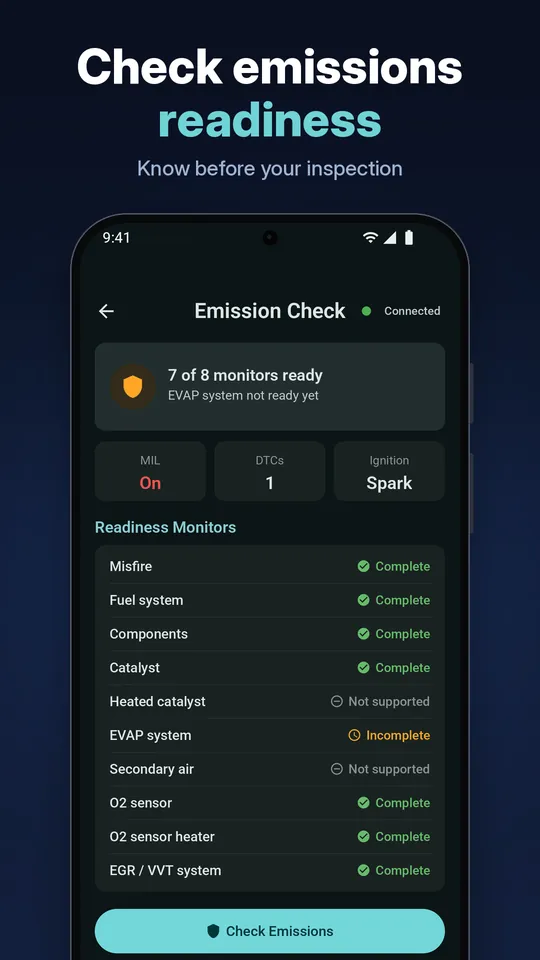
Know before you inspect: emission readiness check, Mode 06 and freeze frame data.

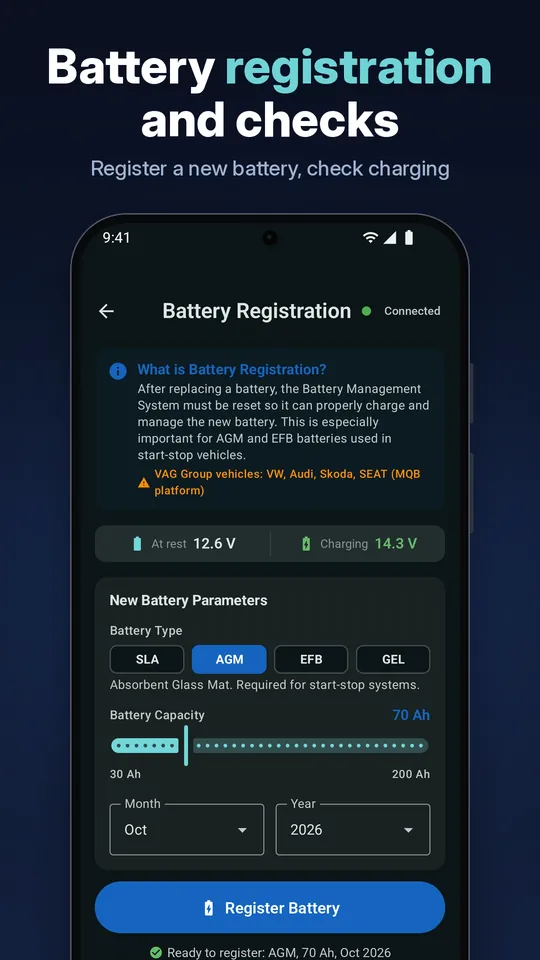
  • TPMS sensor registration and battery registration
  • Hyundai / Kia actuator tests where supported
  • OBD terminal for raw AT commands and full sensor list

Performance tests

Measure your car's acceleration with built-in timers.

  • 0-100 km/h (0-62 mph)
  • 37-62 mph and 0-93 mph
  • Quarter mile

Car health & battery check

A health score from 0 to 100 based on fault codes and key sensors, with history.

  • 12V battery and alternator analysis, battery drain test
  • EV and hybrid battery data (SOC / SOH) where supported

Garage & reports

Keep every car organised in your vehicle garage with make, year and VIN.

  • Trip log and maintenance reminders
  • Threshold alerts
  • Report export (CSV, QR)

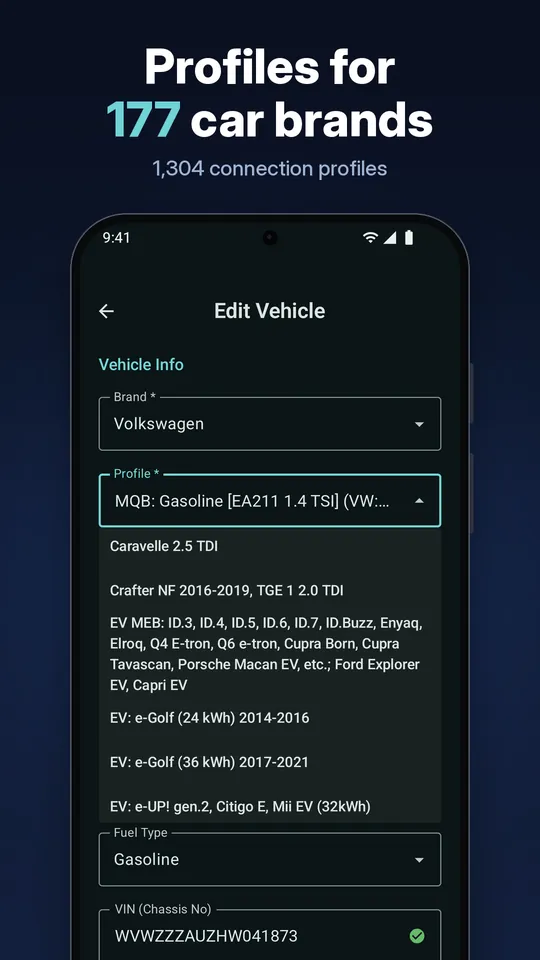
177 brands, 1,304 profiles

Connection profiles for 177 brands plus a generic OBD2 / EOBD profile for any OBD2 compliant vehicle, including some motorcycles where the profile supports it.

Works with ELM327 adapters

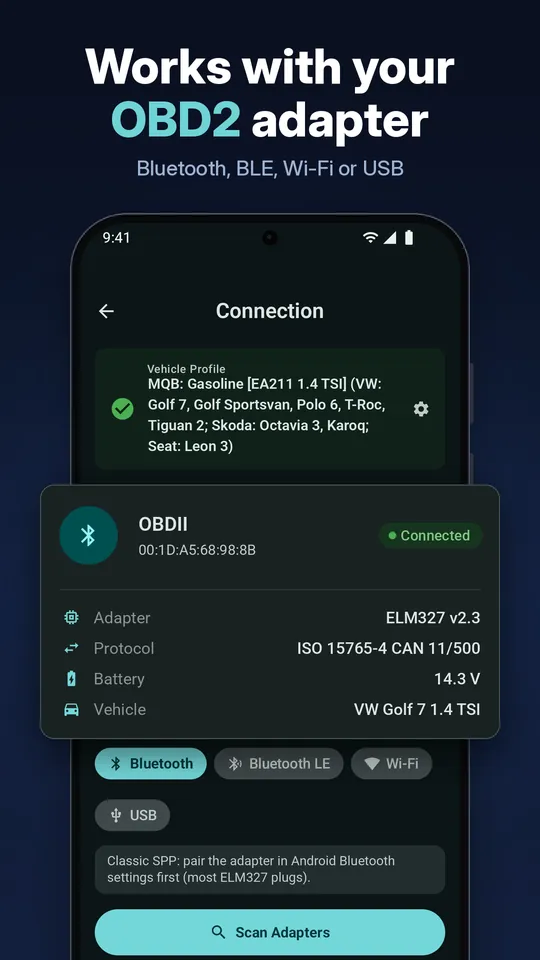
Bluetooth Classic, Bluetooth LE, Wi-Fi and USB OTG. Standard ELM327 and ELM329 class adapters, no proprietary dongle needed.

See it in action

A clean, dark interface built for use in the garage or on the road.

OBD Master Pro screen: Read and clear fault codes
Read and clear fault codes
OBD Master Pro screen: Live data and gauges
Live data and gauges
OBD Master Pro screen: ECU coding
ECU coding
OBD Master Pro screen: Bluetooth, BLE, Wi-Fi or USB adapter connection
Bluetooth, BLE, Wi-Fi or USB adapter connection
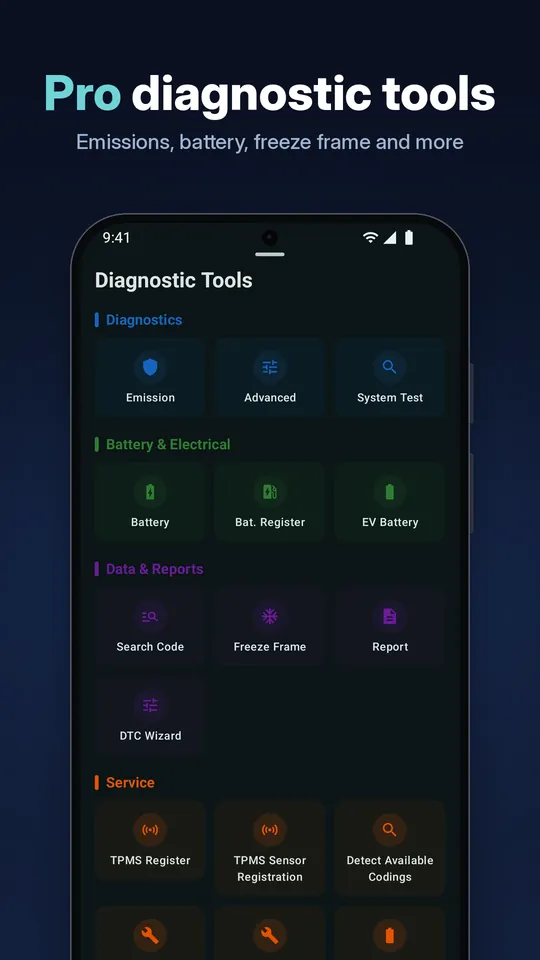
OBD Master Pro screen: Pro diagnostic tools
Pro diagnostic tools
OBD Master Pro screen: Emissions readiness check
Emissions readiness check
OBD Master Pro screen: Battery registration and checks
Battery registration and checks
OBD Master Pro screen: Profiles for 177 car brands
Profiles for 177 car brands

How it works

Three steps from plugging in to knowing what's wrong.

Plug in the adapter

Plug your ELM327 OBD2 adapter into your car's OBD2 port, usually under the dashboard near the steering column, and turn the ignition on.

Connect

Open OBD Master Pro and connect over Bluetooth, Bluetooth LE, Wi-Fi or USB. Pick your car's profile or use the generic OBD2 / EOBD profile.

Scan

Scan for trouble codes, check readiness, watch live sensor data and get a health score for your car in seconds.

Supported adapters

OBD Master Pro works with standard ELM327 and ELM329 class adapters. You don't need a proprietary dongle.

Bluetooth ClassicPair once in Android settings, connect from the Bluetooth tab.
Bluetooth LENo pairing needed. Connect from the BLE tab.
Wi-FiJoin the adapter's Wi-Fi network and connect.
USB OTGWired connection with a USB OTG cable.
CANISO 9141-2KWP2000J1850J1939

Adapter tip: many cheap ELM327 clones only handle engine OBD2 and drop out on ABS or airbag. For multi-module diagnostics and coding, use a genuine ELM327 class adapter. A list of tested adapters is available inside the app.

Frequently asked questions

What OBD2 adapter do I need?

Any standard ELM327 or ELM329 class OBD2 adapter works. OBD Master Pro supports Bluetooth Classic, Bluetooth LE (no pairing needed), Wi-Fi and USB OTG adapters. No proprietary dongle is required.

Will OBD Master Pro work with my car?

It works with OBD2 / EOBD compliant vehicles through the generic OBD2 profile, and includes 1,304 connection profiles for 177 brands. Which modules and extra data you can read depends on your car, its modules and your adapter.

Is OBD Master Pro available for iPhone (iOS)?

OBD Master Pro is available now for Android on Google Play. An iOS version for iPhone is coming soon.

Can I turn off the check engine light?

Yes. You can clear stored trouble codes and reset the check engine light. If the underlying fault is still present, the light will come back, so read and fix the cause first.

Why does my adapter connect to engine data but not ABS or airbag?

Many cheap ELM327 clones only handle basic engine OBD2 and drop out on ABS or airbag modules. For multi-module diagnostics and coding, use a genuine ELM327 class adapter. Bluetooth LE adapters connect from the BLE tab and classic Bluetooth adapters from the Bluetooth tab.

Does the app support ECU coding?

Yes. Coding is available for VAG (VW, Audi, Skoda, Seat, Cupra), BMW (E and F/G/I), Hyundai / Kia, Renault, Stellantis / FCA, Nissan, Ford and Toyota / Lexus, including long coding, adaptations, service resets where supported, and coding backup and restore.

Which performance tests are included?

The app includes 0-100 km/h (0-62 mph), 37-62 mph, 0-93 mph and quarter-mile tests. Only run performance tests where it is legal and safe, such as a closed track.

My adapter will not connect. How can I get help?

Open the app, go to Connection, try to connect, then use Share connection log and email it to contact@obdmasterpro.com. Support is free.
Get in touch

Questions, feedback or connection trouble? Email us and our team will help. If your adapter won't connect, attach the connection log from the app (Connection > Share connection log).

contact@obdmasterpro.com

Follow OBD Master Pro

Get it on Google Play